Raspberry Pi Projects: Getting Started and Advanced Steps in Hobby Electronics
The tiny Raspberry Pi computer opens up endless possibilities in the world of hobby electronics. Bring your own creative projects to life with this guide.
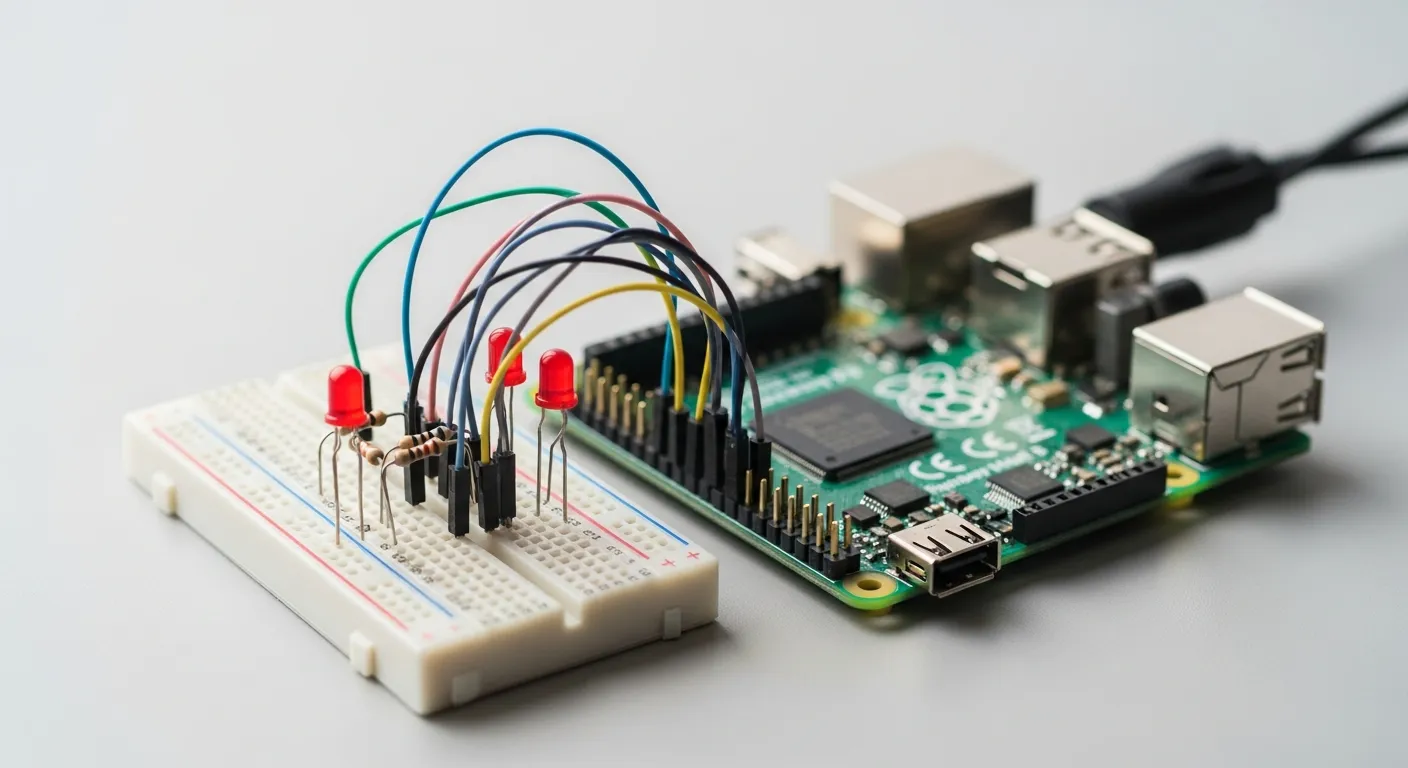
Despite its small size, the Raspberry Pi is a single-board computer that has revolutionized the world of hobby electronics with its powerful processing capabilities. This guide will detail projects you can build with Raspberry Pi, from beginner to advanced levels, inspiring and guiding you to turn your electronic dreams into reality. Whether you want to smarten up your home or build your own gaming console, Raspberry Pi offers endless possibilities.
What is Raspberry Pi?
Raspberry Pi is a credit-card-sized, low-cost single-board computer (SBC) developed by the Raspberry Pi Foundation in the United Kingdom. It essentially combines the capabilities of a microcontroller and a full-fledged computer, controllable with programming languages like Python, and capable of interacting with various sensors, displays, and other electronic components. It can run Linux-based operating systems, which provides compatibility with a wide range of software. Although this small device is used in many fields, from education to industrial automation, it is particularly popular for hobby electronics and DIY (Do It Yourself) projects.
Why Raspberry Pi for Hobby Electronics?
There are many features that make Raspberry Pi attractive for hobby electronics:
- Affordable Cost: It is much more economical compared to other development boards or full computers. This allows you to undertake budget-friendly projects.
- Extensive Community Support: You can find thousands of projects, tutorials, and help resources online. You can quickly get support when you encounter problems or are looking for new ideas.
- Versatility: It can be used in a wide range of applications, from media centers to robotic control, smart home systems to web servers. Its ability to interact directly with hardware, not just software, is unique.
- Programming-Friendly: It can be easily programmed with user-friendly languages like Python. Thanks to its GPIO (General Purpose Input/Output) pins, it interacts easily with the outside world, simplifying work with sensors and actuators.
- Compact Size: Ideal for small projects and embedded systems. It allows you to fit your projects into confined spaces.
- Continuous Development: New models and software updates are constantly released, keeping your hobby up-to-date and allowing you to explore new possibilities.
What You Need to Get Started with Raspberry Pi Projects
Before starting a Raspberry Pi project, you will need some basic materials:
- Raspberry Pi Board: Model selection varies according to your project's requirements (e.g., Pi 4, Pi Zero). The Pi 4 is ideal for more powerful projects, while the Pi Zero W is suitable for smaller, low-power consumption projects.
- Power Supply: A USB-C (for Pi 4) or micro USB adapter (for other models) with the correct voltage and current ratings.
- MicroSD Card: At least a 16GB, Class 10 speed card for installing the operating system. A high-quality card is important for performance.
- Keyboard, Mouse, and Monitor: Required for initial setup. After setup, you may not need them by accessing remotely via SSH or VNC.
- Case (Optional): To protect the board, cool it, and give your project an aesthetic look.
- Breadboard and Jumper Wires: For experimenting with electronic components without soldering. This speeds up the prototyping process.
- Basic Electronic Components: Resistors, LEDs, sensors (such as temperature, humidity, motion) vary depending on your project.
Raspberry Pi OS (formerly Raspbian) is typically used as the operating system. This is a Debian-based Linux distribution offering easy installation and extensive support. Installation is quite simple with tools like Raspberry Pi Imager.
Popular Raspberry Pi Project Ideas
The projects you can create with Raspberry Pi are limited only by your imagination. Here are a few popular ideas at different levels:
Beginner Level Projects
- Media Center: Combine Raspberry Pi with the popular Kodi software to set up your own home theater system. Connect it to your TV to play your movies, TV shows, and music. Its user-friendly interface makes it enjoyable for the whole family.
- Retro Gaming Console: Create an emulator console to play old games with operating systems like RetroPie or Recalbox. Rediscover the arcade games of your childhood or host nostalgic game nights with friends.
- Smart Frame/Weather Station: Build a simple device that displays current weather, calendar, or digital photos on a Raspberry Pi screen. It adds a modern touch to your home or office decor.
- Network Attached Storage (NAS) Server: Connect USB drives to your Raspberry Pi to create a low-cost storage solution for your home network. You can access your files from home or remotely and simplify your backup processes.
Intermediate Level Projects
- Home Automation System: Integrate home devices like lighting, thermostat control, and security cameras with Raspberry Pi to set up a smart home system. For example, you can turn lights on and off at specific times or receive notifications when motion is detected. For more information on smart home security, you can check out our article Smart Door Locks and Home Security Technologies: A Comprehensive Guide.
- Automatic Plant Watering System: Develop a system that automatically waters your plants using soil moisture sensors and a small pump. If you're looking for easy solutions for plant care, our article Automatic Watering Systems for Houseplants: Easy Care, Healthy Plants can help you.
- Your Own Cloud Server: Create your personal cloud storage space with software like Nextcloud to keep control of your data. This reduces your reliance on third-party services and enhances your privacy.
- Smart Alarm Clock: Build a personalized alarm clock that provides data like weather, traffic information, or wakes you up with music. To go further in this area, you can refer to our article Enhance Sleep Hygiene with Smart Alarm Systems: Wake Up More Refreshed.
Advanced Level Projects
- Robotic Arms or Mobile Robots: Build autonomous robots equipped with motor drivers, sensors, and cameras. Develop motion algorithms and task planning with Python. These projects combine mechanical, electronic, and software skills.
- AI-Powered Image Processing: Develop AI applications such as object recognition, facial recognition, or motion detection with a camera module. For example, you can automatically recognize a package delivered to your door and send a notification.
- Your Own Network Gateway/Firewall: Set up a custom router or firewall to monitor network traffic and enhance security. This allows you to gain in-depth knowledge of network management and security.
- Air Quality Monitoring Station: Collect environmental data using various gas sensors and visualize this data through a web interface. This develops your environmental awareness and data collection skills.
Raspberry Pi Model Comparison
Different Raspberry Pi models offer various advantages depending on project requirements. Here's a brief comparison of popular models:
| Feature | Raspberry Pi 4 Model B (4GB) | Raspberry Pi 3 Model B+ | Raspberry Pi Zero W |
|---|---|---|---|
| Processor | 1.5 GHz Quad-Core ARM Cortex-A72 | 1.4 GHz Quad-Core ARM Cortex-A53 | 1 GHz Single-Core ARM Cortex-A53 |
| RAM | 2GB, 4GB, or 8GB LPDDR4 | 1GB LPDDR2 | 512MB LPDDR2 |
| Connectivity | Dual-Band WiFi, Bluetooth 5.0, Gigabit Ethernet, 2x USB 3.0, 2x USB 2.0 | Dual-Band WiFi, Bluetooth 4.2, Gigabit Ethernet (via USB) | WiFi (N), Bluetooth 4.1 |
| Video Output | 2x Micro HDMI (4K supported) | 1x HDMI (1080p) | 1x Mini HDMI (1080p) |
| GPIO Pins | 40 pin | 40 pin | 40 pin |
| Power Supply | USB-C | Micro USB | Micro USB |
| Ideal Use | Computationally intensive projects, desktop use, dual display | General-purpose projects, smart home, media center | Small, low-power projects, embedded systems |
| Approximate Price | Medium - High | Medium | Low |
Tips for a Successful Raspberry Pi Project
Here are some tips to ensure your project progresses smoothly when working with Raspberry Pi:
- Do Your Research: Before starting, examine similar projects and learn from others' experiences. Many open-source projects can guide you.
- Start Small: Choose a simple idea for your first project. A sense of accomplishment boosts your motivation and makes it easier to move on to more complex projects.
- Progress Step-by-Step: Break down complex projects into small, manageable steps. Test each step and ensure it works before moving on to the next.
- Leverage the Community: Raspberry Pi has a large and active community. Ask for help and post your questions on forums, Reddit, or Discord groups. You'll usually receive quick and constructive feedback.
- Develop a Documentation Habit: Note down every step you take, the code you use, and any issues you encounter. This will be a valuable resource for your future projects and simplify potential troubleshooting processes.
- Be Patient: Learning electronics and programming takes time. Don't be afraid to make mistakes; every mistake is a learning opportunity. The trial-and-error process is a natural part of this hobby.
- Use Reliable Resources: Obtain information from trusted sources such as official Raspberry Pi documentation and reputable technology blogs. Incorrect or incomplete information can jeopardize your project.
Raspberry Pi is not just a computer board for hobby electronics enthusiasts; it's also a platform offering limitless creative potential. Whether you're a beginner or an experienced maker, you'll always find something new to explore with the wide range of projects Raspberry Pi offers. As you bring your own projects to life, you'll develop your technical skills and create unique solutions that simplify or make your daily life more enjoyable. Get a Raspberry Pi now and open the doors to the world of electronics!
Resources
Frequently Asked Questions
Is Raspberry Pi difficult to learn?
With basic programming knowledge (especially Python) and a little patience, anyone can start Raspberry Pi projects. Extensive online resources and active community support make learning easier.
Which Raspberry Pi model should I start with?
For most beginner projects, the Raspberry Pi 3 Model B+ or Raspberry Pi 4 Model B is suitable. For smaller, low-power, simple projects, the Pi Zero W can be preferred.
Which programming language is used for Raspberry Pi?
The most commonly used language is Python. It's ideal for controlling GPIO pins and developing various applications. Additionally, languages like C/C++, Java, and Node.js can also be used.
Is additional hardware required for Raspberry Pi projects?
Yes, depending on your project, various additional electronic components such as sensors (temperature, humidity, motion), motors, LEDs, buttons, and displays may be needed.
What can't I do with Raspberry Pi?
Raspberry Pi is not designed to run modern games requiring high graphics performance or very demanding professional desktop software. The performance of a full-fledged gaming PC or workstation should not be expected.
How is the operating system installed for Raspberry Pi?
You can easily write the operating system (usually Raspberry Pi OS) to a microSD card using the Raspberry Pi Imager software. This tool significantly simplifies the installation process.
This content was researched and prepared by the İlgi Alanları editorial team and reviewed for accuracy and readability before publication. Information on health, finance and investment topics is general in nature and does not replace professional advice.